
Azure Policy is the cornerstone of governance in Azure. Creating and deploying policies at scale, as well as managing policy and initiative assignments for a large enterprise, is a massive undertaking. In highly regulated industries, the number of policies can run into hundreds to meet compliance requirements. The policy definition itself, when embedded in code, will make the code verbose and unmanageable. A cleaner way to approach custom policy creation would be to separate the policy definition from the Terraform config.
Policy rule and policy parameter JSON files
Custom policy definition has a few components — policy rule, policy parameters, and policy metadata. The idea is to have policy rules and policy parameters as separate JSON files. One policy rule json file and one policy parameter json file per custom policy. The list of policies and initiatives will be in another json file called policies.json. This way in the main.tf, you can loop through the policies and initiatives and create the definition resources. All these files are located in the “policies” subfolder.
Now, here are the policy rule and policy parameter JSON files. The policy rule file’s name is the same as the policy. The parameter file has the word “parameters” added to the end.
allowedlocations.json
{
    "if": {
        "not": {
            "field": "location",
            "in": "[parameters('allowedLocations')]"
        }
    },
    "then": {
        "effect": "audit"
    }
}
allowedlocationsparameters.json
{
    "allowedLocations": {
        "type": "array",
        "metadata": {
            "description": "The list of locations that can be specified when deploying resources",
            "strongType": "location",
            "displayName": "Allowed locations"
        },
        "defaultValue": [
            "australiaeast"
        ]
    }
}
enforcenaming.json
{
  "if": {
    "allOf": [
      {
        "field": "type",
        "equals": "Microsoft.Compute/virtualMachines"
      },
      {
        "field": "name",
        "notLike": "[parameters('namingPattern')]"
      }
    ]
  },
  "then": {
    "effect": "deny"
  }
}
enforcenamingparameters.json
{
  "namingPattern": {
    "type": "String",
    "metadata": {
      "displayName": "Naming Pattern",
      "description": "The naming pattern the resource name must match, e.g., 'proj-env-*-vm'."
    }
  }
}
enforcetagging.json
{
  "if": {
    "allOf": [
      {
        "field": "[concat('tags[', parameters('tagName'), ']')]",
        "exists": "false"
      },
      {
        "field": "[concat('tags[', parameters('tagName'), ']')]",
        "notIn": "[parameters('tagValues')]"
      }
    ]
  },
  "then": {
    "effect": "deny"
  }
}
enforcetaggingparameters.json
{
  "tagName": {
    "type": "String",
    "metadata": {
      "displayName": "Tag Name",
      "description": "The name of the tag to enforce (e.g., 'Environment')."
    }
  },
  "tagValues": {
    "type": "Array",
    "metadata": {
      "displayName": "Allowed Tag Values",
      "description": "The list of allowed values for the specified tag (e.g., ['Production', 'Development', 'Testing'])."
    }
  }
}
The policies and initiatives list
Let us look at the policies.json file. This file contains the list of policies and initiatives that we will deploy. It contains the policy metadata like name, description, and category, followed by initiative metadata. The json file defines the initiative parameters and how those parameters map to the policy parameters contained in the initiative.
Adding the same policy with different parameter values
The structure is flexible. It caters to the scenario where the same policy needs to be included in the initiative definition with different parameter values. For example, the enforcetagging policy is included twice in the TaggingNamingInitiative initiative – once with environment as the tag name and once with costcentre as the tag name.
policies.json
{
  "policies": [
    {
      "name": "allowedlocations",
      "description": "Ensures that resources are deployed only in specified locations.",
      "category": "General"
    },
    {
      "name": "enforcetagging",
      "description": "Ensures that resources have the required tags.",
      "category": "General"
    },
    {
      "name": "enforcenaming",
      "description": "Ensures that all resource names follow the standard pattern.",
      "category": "General"
    }
  ],
  "initiatives": [
    {
      "name": "LocationInitiative",
      "description": "Enforces all location-related policies.",
      "policy_definitions": [
        {
          "policy_name": "allowedlocations",
          "policy_reference_id": "allowed-locations",
          "parameters": {
            "allowedLocations": {
              "value": "[parameters('locations')]"
            }
          }
        }
      ],
      "parameters": {
        "locations": {
          "type": "Array",
          "defaultValue": [
            "australiaeast"
          ]
        }
      }
    },
    {
      "name": "TaggingNamingInitiative",
      "description": "Enforces a consistent naming and tagging standard for all resources.",
      "policy_definitions": [
        {
          "policy_name": "enforcetagging",
          "policy_reference_id": "environment-tag",
          "parameters": {
            "tagName": {
              "value": "[parameters('environmentTagName')]"
            },
            "tagValues": {
              "value": "[parameters('environmentTagValues')]"
            }
          }
        },
        {
          "policy_name": "enforcetagging",
          "policy_reference_id": "costcentre-tag",
          "parameters": {
            "tagName": {
              "value": "[parameters('costcentreTagName')]"
            },
            "tagValues": {
              "value": "[parameters('costcentreTagValues')]"
            }
          }
        },
        {
          "policy_name": "enforcenaming",
          "policy_reference_id": "naming-standard",
          "parameters": {
            "namingPattern": {
              "value": "[parameters('namingPattern')]"
            }
          }
        }
      ],
      "parameters": {
        "environmentTagName": {
          "type": "String",
          "metadata": {
            "displayName": "Environment Tag Name",
            "description": "The name of the tag to enforce (e.g., 'environment')."
          }
        },
        "environmentTagValues": {
          "type": "Array",
          "metadata": {
            "displayName": "Environment Allowed Tag Values",
            "description": "The list of allowed values for the specified tag (e.g., ['Production', 'Development'])."
          }
        },
        "costcentreTagName": {
          "type": "String",
          "metadata": {
            "displayName": "Cost Centre Tag Name",
            "description": "The name of the tag to enforce (e.g., 'costcentre')."
          }
        },
        "costcentreTagValues": {
          "type": "Array",
          "metadata": {
            "displayName": "Cost Centre Allowed Tag Values",
            "description": "The list of allowed values for the specified tag (e.g., ['CC-1001', 'CC-2002'])."
          }
        },
        "namingPattern": {
          "type": "String",
          "metadata": {
            "displayName": "Naming Pattern",
            "description": "The naming pattern the resource name must match (e.g., 'proj-env-*-vm')."
          }
        }
      }
    }
  ]
}
Here are the locals that are required in the main.tf for custom policy definition:
locals {
  policyinitiative_data = jsondecode(file("${path.root}/policies/policies.json"))

  # Access the 'policies' and 'initiatives' arrays within the root object.
  policy_data      = lookup(local.policyinitiative_data, "policies", [])
  initiative_data = lookup(local.policyinitiative_data, "initiatives", [])
}
Here is the data block that is required. All policies and initiatives will be deployed at the root management group so that they will be available for assignment in all the child management groups and subscriptions.
data "azurerm_management_group" "definition_management_group" {
  display_name = "Tenant Root Group"
}
Finally, here is the azurerm_policy_definition resource.
resource "azurerm_policy_definition" "custom_policy" {
  for_each = { for policy in local.policy_data : policy.name => policy }

  name         = "Policy-${each.value.name}"
  policy_type  = "Custom"
  mode         = "All"
  display_name = "Custom Policy - ${each.value.name}"
  description  = each.value.description
  metadata = jsonencode({
    category = each.value.category
  })
  policy_rule         = file("${path.module}/policies/${each.value.name}.json")
  parameters          = file("${path.module}/policies/${each.value.name}parameters.json")
  management_group_id = data.azurerm_management_group.definition_management_group.id
}
Here is the initiative definition resource block.
resource "azurerm_management_group_policy_set_definition" "custom_initiative" {
  for_each            = { for initiative in local.initiative_data : initiative.name => initiative }
  name                = "Initiative-${each.value.name}"
  display_name        = "Custom Initiative - ${each.value.name}"
  description         = each.value.description
  policy_type         = "Custom"
  management_group_id = data.azurerm_management_group.definition_management_group.id
  parameters          = jsonencode(each.value.parameters)
  dynamic "policy_definition_reference" {
    for_each = each.value.policy_definitions
    content {
      reference_id         = lookup(policy_definition_reference.value, "policy_reference_id", null)
      policy_definition_id = azurerm_policy_definition.custom_policy[policy_definition_reference.value.policy_name].id
      parameter_values     = jsonencode(lookup(policy_definition_reference.value, "parameters", {}))
    }
  }
}
Results
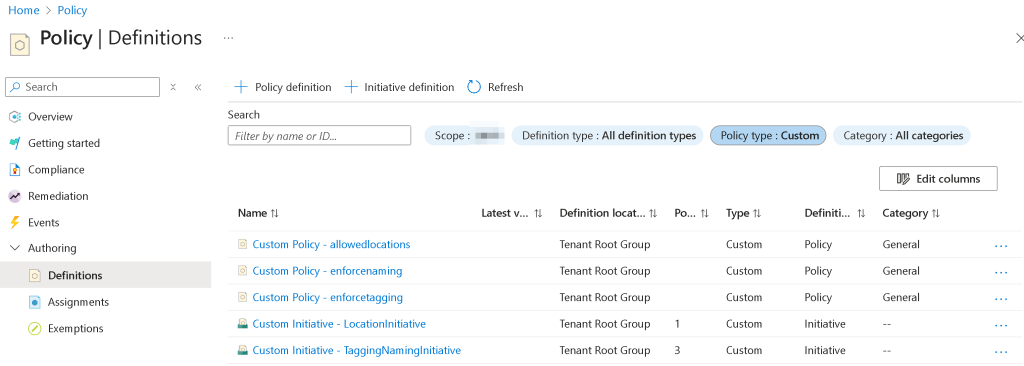
Deploying this code will deploy the custom Azure policies and initiatives listed in the policies.json file. Here is the screenshot of the custom policies and initiatives after terraform apply.
Extending the engine to deploy more policies and initiatives
You can modify this policy engine by adding or deleting policies and initiatives that suit your needs. You simply add the policy rule and policy parameter json files in the policies folder. You then modify the policy and possibly the initiative array in the policies.json file to pick up the new policy and bundle it as an initiative. No code change required. I will cover policy assignment in Part 2 of this blog post.
 Ramya Jayapal