
In Part 3 of this series, I’ll automate the creation of AKS. We will add a AKS resource to the ARM template. A new Azure CLI task will be added to the pipeline to assign AcrPull role to the SP of the kubelet.
ARM Template
The below template shows the addition of the AKS cluster resource.
{
  "$schema": "https://schema.management.azure.com/schemas/2019-04-01/deploymentTemplate.json#",
  "contentVersion": "1.0.0.0",
  "parameters": {
    "acrName": {
      "type": "string",
      "defaultValue": "[concat('acr', uniqueString(resourceGroup().id))]",
      "minLength": 5,
      "maxLength": 50,
      "metadata": {
        "description": "Globally unique name of your Azure Container Registry"
      }
    },
    "acrAdminUserEnabled": {
      "type": "bool",
      "defaultValue": false,
      "metadata": {
        "description": "Enable admin user that has push / pull permission to the registry."
      }
    },
    "location": {
      "type": "string",
      "defaultValue": "[resourceGroup().location]",
      "metadata": {
        "description": "Location for registry."
      }
    },
    "acrSku": {
      "type": "string",
      "defaultValue": "Basic",
      "allowedValues": [
        "Basic"
      ],
      "metadata": {
        "description": "Tier of your Azure Container Registry."
      }
    },
    "clusterName": {
      "defaultValue": "akstest",
      "type": "String"
    },
    "osDiskSizeGB": {
      "type": "int",
      "defaultValue": 128,
      "minValue": 0,
      "maxValue": 1023,
      "metadata": {
        "description": "Disk size (in GB) to provision for each of the agent pool nodes. This value ranges from 0 to 1023. Specifying 0 will apply the default disk size for that agentVMSize."
      }
    },
    "agentCount": {
      "type": "int",
      "defaultValue": 1,
      "minValue": 1,
      "maxValue": 50,
      "metadata": {
        "description": "The number of nodes for the cluster."
      }
    },
    "agentVMSize": {
      "type": "string",
      "defaultValue": "Standard_B2s",
      "metadata": {
        "description": "The size of the Virtual Machine."
      }
    },
    "osType": {
      "type": "string",
      "defaultValue": "Linux",
      "allowedValues": [
        "Linux"
      ],
      "metadata": {
        "description": "The type of operating system."
      }
    }
  },
  "resources": [
    {
      "comments": "Container registry for storing docker images",
      "type": "Microsoft.ContainerRegistry/registries",
      "apiVersion": "2019-12-01-preview",
      "name": "[parameters('acrName')]",
      "location": "[parameters('location')]",
      "sku": {
        "name": "[parameters('acrSku')]",
        "tier": "[parameters('acrSku')]"
      },
      "tags": {
        "displayName": "Container Registry",
        "container.registry": "[parameters('acrName')]"
      },
      "properties": {
        "adminUserEnabled": "[parameters('acrAdminUserEnabled')]"
      }
    },
    {
      "type": "Microsoft.ContainerService/managedClusters",
      "apiVersion": "2021-03-01",
      "name": "[parameters('clusterName')]",
      "location": "[parameters('location')]",
      "sku": {
        "name": "Basic",
        "tier": "Free"
      },
      "identity": {
        "type": "SystemAssigned"
      },
      "properties": {
        "kubernetesVersion": "1.19.9",
        "dnsPrefix": "[concat(parameters('clusterName'), '-dns')]",
        "agentPoolProfiles": [
          {
            "name": "agentpool",
            "osDiskSizeGB": "[parameters('osDiskSizeGB')]",
            "count": "[parameters('agentCount')]",
            "vmSize": "[parameters('agentVMSize')]",
            "osType": "[parameters('osType')]",
            "storageProfile": "ManagedDisks",
            "mode": "System"
          }
        ]
      }
    }
  ],
  "outputs": {
    "containerRegistryName": {
      "value": "[reference(resourceId('Microsoft.ContainerRegistry/registries',parameters('acrName')),'2019-12-01-preview').loginServer]",
      "type": "string"
    }
  }
}
Managed identity is turned on by specifying the following:
"identity": {
    "type": "SystemAssigned"
  }
Modify the PowerShell script that deploys the ARM template to accept the AKS cluster name as a parameter.
param(
    [string] $ResourceGroupName,
    [string] $AKSName
)


$templateFilePath = [System.IO.Path]::Combine($PSScriptRoot, 'template.json')

$rgDeploymentOutput = New-AzResourceGroupDeployment `
    -ResourceGroupName $ResourceGroupName `
    -TemplateFile $templateFilePath `
    -clusterName $AKSName

foreach ($key in $rgDeploymentOutput.Outputs.Keys)
{
    $value = $rgDeploymentOutput.Outputs[$key].Value
    Write-Host "##vso[task.setvariable variable=$key]$value"
}
Pipeline Variables
Add another variable called aksName and set it to the name of the aks cluster.
Pipeline Tasks
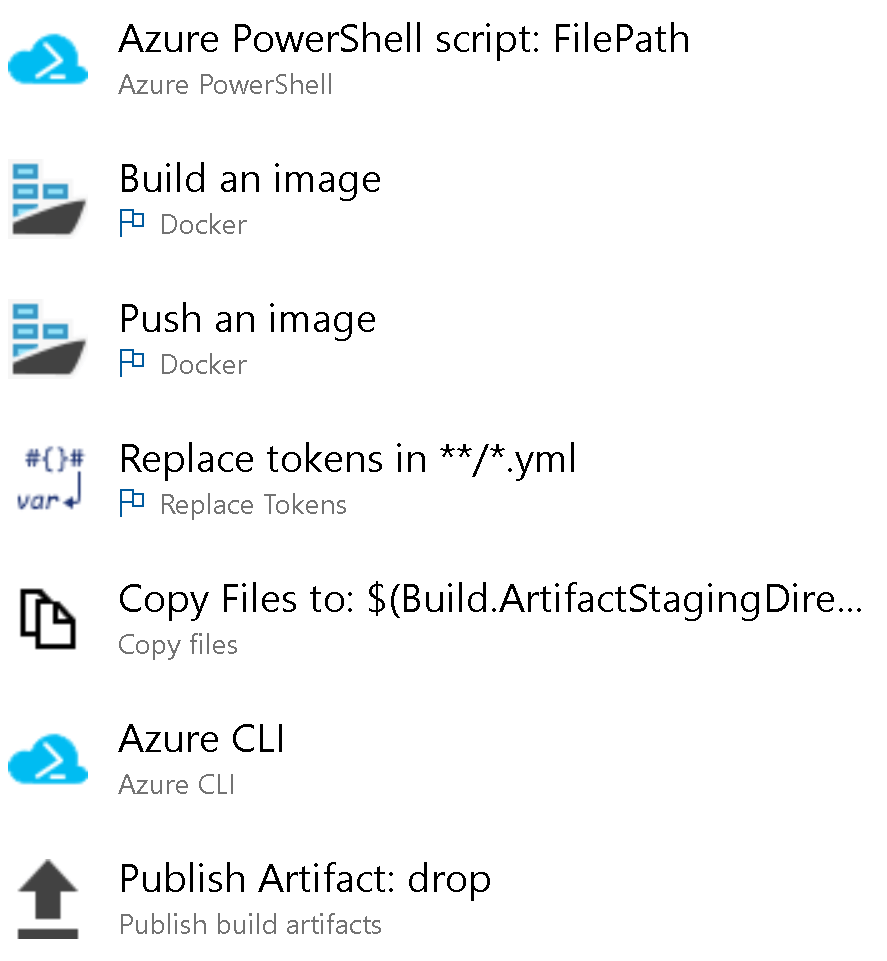
Add a Azure CLI task to the build pipeline after the Azure PowerShell task. This script will assign AcrPull role to the kubelet managed identity. Under inline script, paste the following script:
az aks get-credentials --resource-group $(resourceGroupName) --name $(aksName)
ACR_ID=$(az acr show -n $(containerRegistryName) --query "id" --output tsv)
AKS_KUBELET_IDENTITY=$(az aks show -g $(resourceGroupName) -n $(aksName) --query "identityProfile.kubeletidentity.objectId" --output tsv)
az role assignment create --role AcrPull --assignee-object-id $AKS_KUBELET_IDENTITY --scope $ACR_ID
The Script Type will be Shell. To try this script locally, make sure you have the latest version of Azure CLI.
Finally, don’t forget to pass the aksName parameter for the Azure PowerShell task.
Please read the documentation to learn more about managed identities created for AKS. The important message is we need to use the managed identity called <AKS Cluster Name>-agentpool to authenticate with ACR. In the above script we are getting the objectId of the <AKS Cluster Name>-agentpool SP and assigning it the AcrPull role with scope as ACR.
Once you save and run the pipeline, you’ll have both the ACR and AKS setup. AKS will now to able to pull images from ACR.
 Ramya Jayapal