
This post describes the process of creating a Resource Group project, adding resources and deploying the resources to Azure.
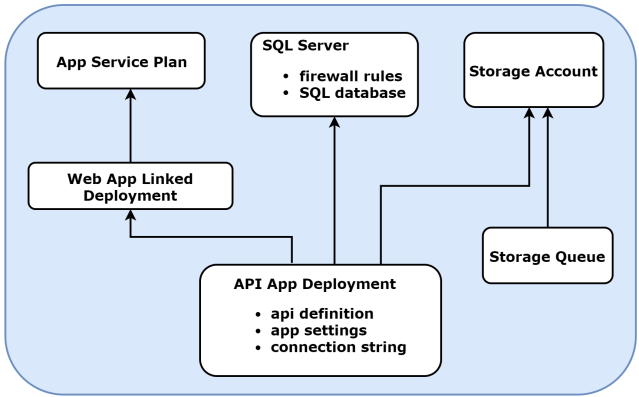
The following image illustrates the resources that are being deployed and their dependencies.
Creating a Resource Group deployment project
Select Azure Resource Group under the Cloud section in the New Project window. A main ARM template JSON file, a parameters JSON file, and a PowerShell script file will be added.
Generating the base template
You can use the template that comes with the Resource Group project as the base or use one of the Azure QuickStart templates. I exported the template from the web application project that I’m trying to deploy.
- Right-click on the project and click Publish.
- Select Create New Profile.
- Select Microsoft Azure App Service and select Create New. Click OK.
- You can create a new Resource Group and App Service Plan or choose an existing one.
- Select the Services tab.
- Click the plus sign next to SQL Database.
- Enter the details for the server and database.
- Click Export.
Replace the existing files in your Azure Resource Group project with the exported files.
Adding resources
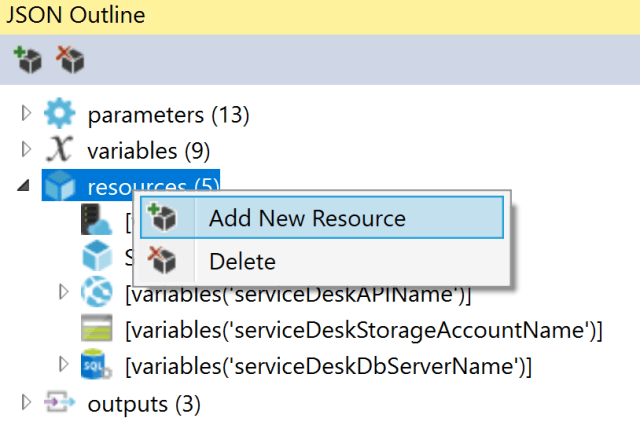
In addition to the resources already present in the template, you may need to add additional resources like, storage accounts. Open the JSON Outline window, right-click on the resources section, select Add New Resource, select the required resource in the popup window that opens, and click Add.

Unique names for resources
Azure requires that you give unique names to certain resources. I used the uniqueString function to generate a hash of the resource group id and appended it to the resource names. If you know a better way of achieving this, please leave a comment.
"variables": {
  "resourceGroupName": "[resourceGroup().name]",
  "resourceGroupUniqueString": "[uniqueString(resourceGroup().id)]",
  "serviceDeskAPIName": "[toLower(concat(parameters('paramServiceDeskAPIName'),variables('resourceGroupUniqueString')))]",
  "serviceDeskSPAName": "[toLower(concat(parameters('paramServiceDeskSPAName'),variables('resourceGroupUniqueString')))]",
  "appServicePlanName": "[toLower(parameters('paramAppServicePlanName'))]",
  "serviceDeskStorageAccountName": "[toLower(concat(parameters('paramStorageAccountName'),variables('resourceGroupUniqueString')))]",
  "serviceDeskDbServerName": "[toLower(concat(parameters('paramDbServerName'),variables('resourceGroupUniqueString')))]",
  "serviceDeskDbName": "[toLower(parameters('paramDbName'))]",
  "serviceDeskEmailQueueName": "[toLower(parameters('paramStorageQueueName'))]"
}
Linking a template
You can link another ARM template from the main template, pass parameters to that template, and use the output values from the linked template. If it’s an external template, then it needs to be hosted online.
To link to an external template and parameter file, use templateLink and parametersLink. When linking to a template, the Resource Manager service must be able to access it. You cannot specify a local file or a file that is only available on your local network. You can only provide a URI value that includes either http or https. One option is to place your linked template in a storage account, and use the URI for that item.
The linked deployment resource in the main template:
{
    "apiVersion": "2017-05-10",
    "name": "SPAWebsiteDeployment",
    "type": "Microsoft.Resources/deployments",
    "dependsOn": [
      "[resourceId('Microsoft.Web/serverfarms', variables('appServicePlanName'))]"
    ],
    "properties": {
      "mode": "Incremental",
      "templateLink": {
        "uri": "[parameters('paramNestedTemplateBlodUri')]",
        "contentVersion": "1.0.0.0"
      },
      "parameters": {
        "paramServiceDeskSPAName": {
          "value": "[variables('serviceDeskSPAName')]"
        },
        "paramAppServicePlanName": {
          "value": "[variables('appServicePlanName')]"
        },
        "paramServiceDeskAPIUrl": {
          "value": "[concat('https://', variables('serviceDeskAPIName'), '.azurewebsites.net/')]"
        }
      }
    }
  }
Output section of the linked template:
"outputs": {
  "spaurl": {
    "type": "string",
    "value": "[concat('https://', parameters('paramServiceDeskSPAName'), '.azurewebsites.net')]"
  }
}
Reading the output from the linked deployment resource:
"SPA:Url": "[reference('SPAWebsiteDeployment').outputs.spaurl.value]"
SQL Server Admin password
A parameter for the SQL Server admin password will be added when you add a SQL server resource. Removing this from the *.parameters.json file will enable you to enter the password during deployment.

Application Settings
The application settings configured on the Azure portal will override the values in the appsettings.json file. You can configure CORS on the Azure portal but it’s not as flexible as configuring it through code. Azure portal just allows you to add the allowed origins for an app. At the time of writing this post, you can’t set the allowed headers or the allowed http methods.
Validating the template
When you right-click the Resource Group project, you should find a Validate option. I’m using the Visual Studio 2017 Community edition and the Validate option sometimes disappears! Instead, I set the $ValidateOnly variable to true on the PowerShell file and run the deployment. If there are any errors, fix the template and then re-try.
Deploy the resource group
- Right-click on the resource group deployment project and select Deploy.
- You may have to login to your Azure account if you haven’t already done so.
- Select the subscription.
- Click the Resource Group drop down and select Create New.
- Enter the name of the resource group and location and click Create.
- The deployment template and parameters json files should be populated automatically. If not, pick the main deployment template and it’s parameters file.
- Click Deploy.
- An Edit Parameters dialog box pops up. Verify the parameter values and click Save.
- The deployment will now start.
ARM templates and Idempotency
An important concept that one needs to understand before using ARM templates is that of Idempotency. What will happen when you deploy resources using an ARM template multiple times? What will happen when you leave out a section of the resource? What will happen when you remove the resource itself from the template? Jason Boeshart from Microsoft has written an article on this topic on the MSDN blogs, summarising the various scenarios.
Complete template
{
  "$schema": "http://schema.management.azure.com/schemas/2015-01-01/deploymentTemplate.json#",
  "contentVersion": "1.0.0.0",
  "parameters": {
    "paramServiceDeskAPIName": {
      "type": "string"
    },
    "paramServiceDeskSPAName": {
      "type": "string"
    },
    "paramAppServicePlanName": {
      "type": "string"
    },
    "paramStorageAccountName": {
      "type": "string"
    },
    "paramStorageAccountType": {
      "type": "string"
    },
    "paramDbServerName": {
      "type": "string"
    },
    "paramDbAdminLogin": {
      "type": "string"
    },
    "paramDbAdminPassword": {
      "type": "securestring"
    },
    "paramDbName": {
      "type": "string"
    },
    "paramStorageQueueName": {
      "type": "string"
    },
    "paramSqlServerFirewallIpAddressStart": {
      "type": "string"
    },
    "paramSqlServerFirewallIpAddressEnd": {
      "type": "string"
    },
    "paramNestedTemplateBlodUri": {
      "type": "string"
    }
  },
  "variables": {
    "resourceGroupName": "[resourceGroup().name]",
    "resourceGroupUniqueString": "[uniqueString(resourceGroup().id)]",
    "serviceDeskAPIName": "[toLower(concat(parameters('paramServiceDeskAPIName'),variables('resourceGroupUniqueString')))]",
    "serviceDeskSPAName": "[toLower(concat(parameters('paramServiceDeskSPAName'),variables('resourceGroupUniqueString')))]",
    "appServicePlanName": "[toLower(parameters('paramAppServicePlanName'))]",
    "serviceDeskStorageAccountName": "[toLower(concat(parameters('paramStorageAccountName'),variables('resourceGroupUniqueString')))]",
    "serviceDeskDbServerName": "[toLower(concat(parameters('paramDbServerName'),variables('resourceGroupUniqueString')))]",
    "serviceDeskDbName": "[toLower(parameters('paramDbName'))]",
    "serviceDeskEmailQueueName": "[toLower(parameters('paramStorageQueueName'))]"
  },
  "resources": [
    {
      "type": "Microsoft.Web/serverfarms",
      "sku": {
        "name": "F1",
        "tier": "Free",
        "size": "F1",
        "family": "F",
        "capacity": 0
      },
      "kind": "app",
      "name": "[variables('appServicePlanName')]",
      "apiVersion": "2016-09-01",
      "location": "[resourceGroup().location]",
      "scale": null,
      "properties": {
        "name": "[variables('appServicePlanName')]",
        "workerTierName": null,
        "adminSiteName": null,
        "hostingEnvironmentProfile": null,
        "perSiteScaling": false,
        "reserved": false,
        "targetWorkerCount": 0,
        "targetWorkerSizeId": 0
      },
      "dependsOn": []
    },
    {
      "apiVersion": "2017-05-10",
      "name": "SPAWebsiteDeployment",
      "type": "Microsoft.Resources/deployments",
      "dependsOn": [
        "[resourceId('Microsoft.Web/serverfarms', variables('appServicePlanName'))]"
      ],
      "properties": {
        "mode": "Incremental",
        "templateLink": {
          "uri": "[parameters('paramNestedTemplateBlodUri')]",
          "contentVersion": "1.0.0.0"
        },
        "parameters": {
          "paramServiceDeskSPAName": {
            "value": "[variables('serviceDeskSPAName')]"
          },
          "paramAppServicePlanName": {
            "value": "[variables('appServicePlanName')]"
          },
          "paramServiceDeskAPIUrl": {
            "value": "[concat('https://', variables('serviceDeskAPIName'), '.azurewebsites.net/')]"
          }
        }
      }
    },
    {
      "location": "[resourceGroup().location]",
      "name": "[variables('serviceDeskAPIName')]",
      "type": "Microsoft.Web/sites",
      "apiVersion": "2015-08-01",
      "tags": {
        "[concat('hidden-related:', resourceId(variables('resourceGroupName'),'Microsoft.Web/serverfarms', variables('appServicePlanName')))]": "empty"
      },
      "dependsOn": [
        "[resourceId('Microsoft.Storage/storageAccounts', variables('serviceDeskStorageAccountName'))]",
        "[concat('Microsoft.Sql/servers/', variables('serviceDeskDbServerName'))]",
        "[resourceId('Microsoft.Web/serverfarms', variables('appServicePlanName'))]",
        "SPAWebsiteDeployment"
      ],
      "kind": "api",
      "properties": {
        "name": "[variables('serviceDeskAPIName')]",
        "serverFarmId": "[resourceId(variables('resourceGroupName'),'Microsoft.Web/serverfarms', variables('appServicePlanName'))]",
        "kind": "api"
      },
      "resources": [
        {
          "name": "web",
          "type": "config",
          "apiVersion": "2015-08-01",
          "properties": {
            "apiDefinition": {
              "url": "[concat('https://', reference(resourceId('Microsoft.Web/sites', variables('serviceDeskAPIName'))).hostnames[0], '/swagger/docs/v1')]"
            }
          },
          "dependsOn": [
            "[resourceId('Microsoft.Web/sites', variables('serviceDeskAPIName'))]"
          ]
        },
        {
          "name": "connectionstrings",
          "type": "config",
          "apiVersion": "2015-08-01",
          "dependsOn": [
            "[concat('Microsoft.Web/Sites/', variables('serviceDeskAPIName'))]"
          ],
          "properties": {
            "ApplicationContext": {
              "value": "[concat('Data Source=tcp:', reference(concat('Microsoft.Sql/servers/', variables('serviceDeskDbServerName'))).fullyQualifiedDomainName, ',1433;Initial Catalog=', variables('serviceDeskDbName'), ';User Id=', parameters('paramDbAdminLogin'), '@', variables('serviceDeskDbServerName'), ';Password=', parameters('paramDbAdminPassword'))]",
              "type": 2
            }
          }
        },
        {
          "name": "appsettings",
          "type": "config",
          "apiVersion": "2015-08-01",
          "dependsOn": [
            "[resourceId('Microsoft.Web/sites', variables('serviceDeskAPIName'))]"
          ],
          "tags": {
            "displayName": "appsettings"
          },
          "properties": {
            "SPA:Url": "[reference('SPAWebsiteDeployment').outputs.spaurl.value]",
            "AzureStorage:AccountName": "[variables('serviceDeskStorageAccountName')]",
            "AzureStorage:AccountKey": "[listKeys(resourceId('Microsoft.Storage/storageAccounts', variables('serviceDeskStorageAccountName')), '2016-01-01').keys[0].value]",
            "AzureStorage:QueueName": "[variables('serviceDeskEmailQueueName')]"
          }
        }
      ]
    },
    {
      "location": "[resourceGroup().location]",
      "name": "[variables('serviceDeskStorageAccountName')]",
      "type": "Microsoft.Storage/storageAccounts",
      "apiVersion": "2015-06-15",
      "properties": {
        "accountType": "[parameters('paramStorageAccountType')]"
      }
    },
    {
      "location": "[resourceGroup().location]",
      "name": "[variables('serviceDeskDbServerName')]",
      "type": "Microsoft.Sql/servers",
      "apiVersion": "2014-04-01-preview",
      "properties": {
        "administratorLogin": "[parameters('paramDbAdminLogin')]",
        "administratorLoginPassword": "[parameters('paramDbAdminPassword')]"
      },
      "resources": [
        {
          "location": "[resourceGroup().location]",
          "name": "AllowAllAzureIPs",
          "type": "firewallrules",
          "apiVersion": "2014-04-01",
          "dependsOn": [
            "[concat('Microsoft.Sql/servers/', variables('serviceDeskDbServerName'))]"
          ],
          "properties": {
            "endIpAddress": "0.0.0.0",
            "startIpAddress": "0.0.0.0"
          }
        },
        {
          "location": "[resourceGroup().location]",
          "name": "AllowSome",
          "type": "firewallrules",
          "apiVersion": "2014-04-01",
          "dependsOn": [
            "[concat('Microsoft.Sql/servers/', variables('serviceDeskDbServerName'))]"
          ],
          "properties": {
            "endIpAddress": "[parameters('paramSqlServerFirewallIpAddressEnd')]",
            "startIpAddress": "[parameters('paramSqlServerFirewallIpAddressStart')]"
          }
        },
        {
          "location": "[resourceGroup().location]",
          "name": "[variables('serviceDeskDbName')]",
          "type": "databases",
          "apiVersion": "2014-04-01-preview",
          "dependsOn": [
            "[concat('Microsoft.Sql/servers/', variables('serviceDeskDbServerName'))]"
          ],
          "properties": {
            "collation": "SQL_Latin1_General_CP1_CI_AS",
            "maxSizeBytes": "1073741824"
          }
        }
      ]
    }
  ],
  "outputs": {
    "queuename": {
      "type": "string",
      "value": "[variables('serviceDeskEmailQueueName')]"
    },
    "queuestorageaccountname": {
      "type": "string",
      "value": "[variables('serviceDeskStorageAccountName')]"
    },
    "queuestorageaccountkey": {
      "type": "string",
      "value": "[listKeys(resourceId('Microsoft.Storage/storageAccounts', variables('serviceDeskStorageAccountName')), '2016-01-01').keys[0].value]"
    }
    }
  }
{
    "$schema": "http://schema.management.azure.com/schemas/2015-01-01/deploymentTemplate.json#",
    "contentVersion": "1.0.0.0",
    "parameters": {
      "paramServiceDeskSPAName": {
        "type": "string"
      },
      "paramAppServicePlanName": {
        "type": "string"
      },
      "paramServiceDeskAPIUrl": {
        "type": "string"
      }
    },
    "variables": {
      "resourcegroupname": "[resourceGroup().name]"
    },
    "resources": [
      {
        "location": "[resourceGroup().location]",
        "name": "[parameters('paramServiceDeskSPAName')]",
        "type": "Microsoft.Web/sites",
        "apiVersion": "2015-08-01",
        "tags": {
          "[concat('hidden-related:', resourceId(variables('resourcegroupname'),'Microsoft.Web/serverfarms', parameters('paramAppServicePlanName')))]": "empty"
        },
        "kind": "app",
        "properties": {
          "name": "[parameters('paramServiceDeskSPAName')]",
          "serverFarmId": "[resourceId(variables('resourcegroupname'),'Microsoft.Web/serverfarms', parameters('paramAppServicePlanName'))]",
          "kind": "app"
        },
        "resources": [
          {
            "name": "appsettings",
            "type": "config",
            "apiVersion": "2015-08-01",
            "dependsOn": [
              "[resourceId('Microsoft.Web/sites', parameters('paramServiceDeskSPAName'))]"
            ],
            "tags": {
              "displayName": "appsettings"
            },
            "properties": {
              "ServiceDeskAPIUrl": "[parameters('paramServiceDeskAPIUrl')]"
            }
          }
        ]
      }
    ],
    "outputs": {
      "spaurl": {
        "type": "string",
        "value": "[concat('https://', parameters('paramServiceDeskSPAName'), '.azurewebsites.net')]"
      }
    }
  }
  $result = New-AzureRmResourceGroupDeployment -Name ((Get-ChildItem $TemplateFile).BaseName + '-' + ((Get-Date).ToUniversalTime()).ToString('MMdd-HHmm')) `
  -ResourceGroupName $ResourceGroupName `
  -TemplateFile $TemplateFile `
  -TemplateParameterFile $TemplateParametersFile `
  @OptionalParameters `
  -Force -Verbose `
  -ErrorVariable ErrorMessages
if (!$result.Outputs)
	{
		Write-Output '', 'No Output found.'
	}
	else
	{
		$QueueName = $result.Outputs.Item($QueueNameKey).Value
		$QueueStorageAccountName = $result.Outputs.Item($QueueStorageAccountNameKey).Value
		$QueueStorageAccountKey = $result.Outputs.Item($QueueStorageAccountKeyKey).Value
		$QueueStorageContext = New-AzureStorageContext -StorageAccountName $QueueStorageAccountName -StorageAccountKey $QueueStorageAccountKey

		$QueueObject = Get-AzureStorageQueue -Context $QueueStorageContext  -ErrorAction Ignore | Where-Object {$_.Name -eq $QueueName}
		if (!$QueueObject)
		{
			$queue = New-AzureStorageQueue –Name $QueueName `
			-Context $QueueStorageContext `
			-ErrorVariable QueueErrorMessages
			if ($QueueErrorMessages)
			{
				Write-Output '', 'Queue deployment returned the following errors:', @(@($QueueErrorMessages) | ForEach-Object { $_.Exception.Message.TrimEnd("`r`n") })
			}
		}

	}
Deployed resources
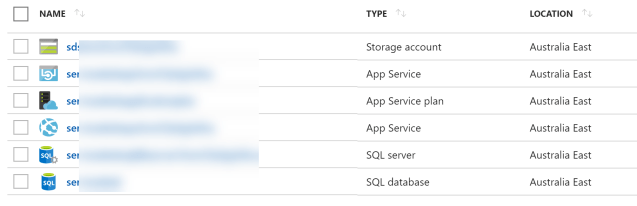
The below image shows the resources deployed using the above ARM template.
 Ramya Jayapal