
I built a Service Desk application in Angular with a Web API backend. The front-end application and the Web API are hosted in the same domain but under different port numbers. Browsers by default block requests from different origins for security reasons.
What is “same origin”?
Two URLs have the same origin if they have identical schemes, hosts, and ports. (RFC 6454)These two URLs have the same origin:
These URLs have different origins than the previous two:
http://example.net – Different domain
http://www.example.com/foo.html – Different subdomain
https://example.com/foo.html – Different scheme
http://example.com:9000/foo.html – Different port
In order to let the Angular SPA talk to the Web API application, Cross Origin Resource Sharing(CORS) needs to be enabled.
This is really simple in .NET Core. Add the line services.AddCors()to the ConfigureServices method in StartUp.cs.
public void ConfigureServices(IServiceCollection services)
{
    services.AddCors();
}
Next, add the CORS middleware to the Configure method. The following line of code enables the access of all Http methods and all headers from the SPA. If you want to allow all origins, instead of the WithOrigins method call the AllowAnyOrigin method.
app.UseCors(builder =>
            builder.WithOrigins(Configuration["SPA:Url"])
           .AllowAnyHeader()
           .AllowAnyMethod()
            );
Order of middleware
Make sure the app.UseCors line is placed above the app.UseMvc line. I spent 2 hours trying to figure out why my cross-site requests were failing. I had the order wrong. You can read more on this here.
The SPA Url is being read from appsettings.json.
"SPA": {
    "Url": ""
  }
That’s it, the SPA app can now make REST method calls to the Web API application.
CORS request/response sequence

The browser first sends an OPTIONS/Pre-flight request with the access-control* headers required for the operation. The image below is a screenshot of the OPTIONS request. The Angular SPA and the Web API run under port numbers 44319 and 44309 respectively.
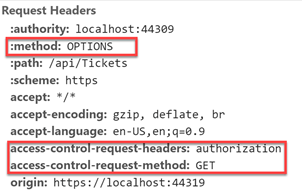
The browser receives the response with access-control-allow-origin set to the domain address of the SPA application.

The browser then sends the actual Http request to the Web API application. In this example, it is a GET request with an Authorization header.
 Ramya Jayapal